Z_ColorMatcher
Match it once. It keeps matching, every frame.
- Nuke
01What it does
- Re-reads both inputs every frame, so the match follows the light instead of drifting off it. No keyframes, no analysis pass.
- The region box matches your element against the patch of plate it sits on, not two whole frames that were never of the same thing.
- Bake Match freezes the result into a plain gain and offset. The farm renders it with no plugin installed.
- Elements with alpha need no setup — the transparent surround never counts toward the match.
- Premult on the way out, so the matched element drops straight into a Merge.
- Two ways to measure: black and white points when both shots have real range, mean and deviation when they are grainy or flat.
- Recover White gives the element its own highlights back when the plate's cast is too strong. Blacks stay matched.
- Temporal median and Smooth Blend hold a moving shot together — nothing flickers, nothing snaps.
02A closer look
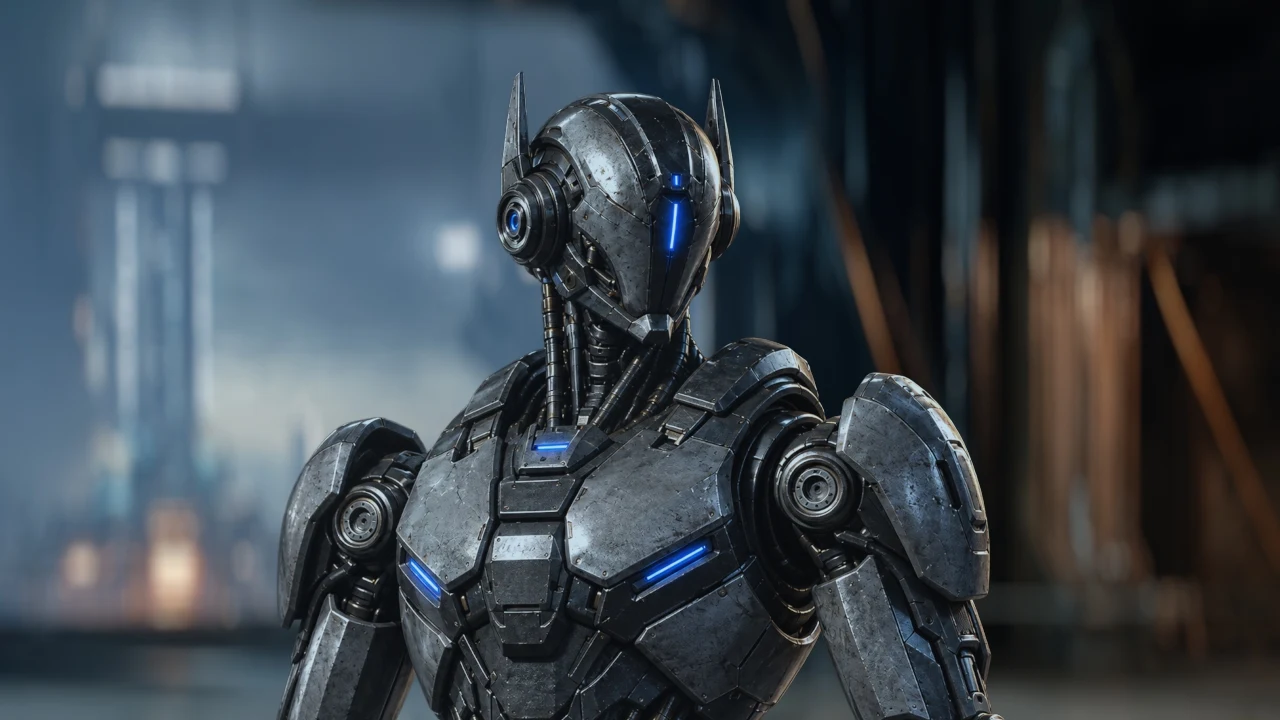
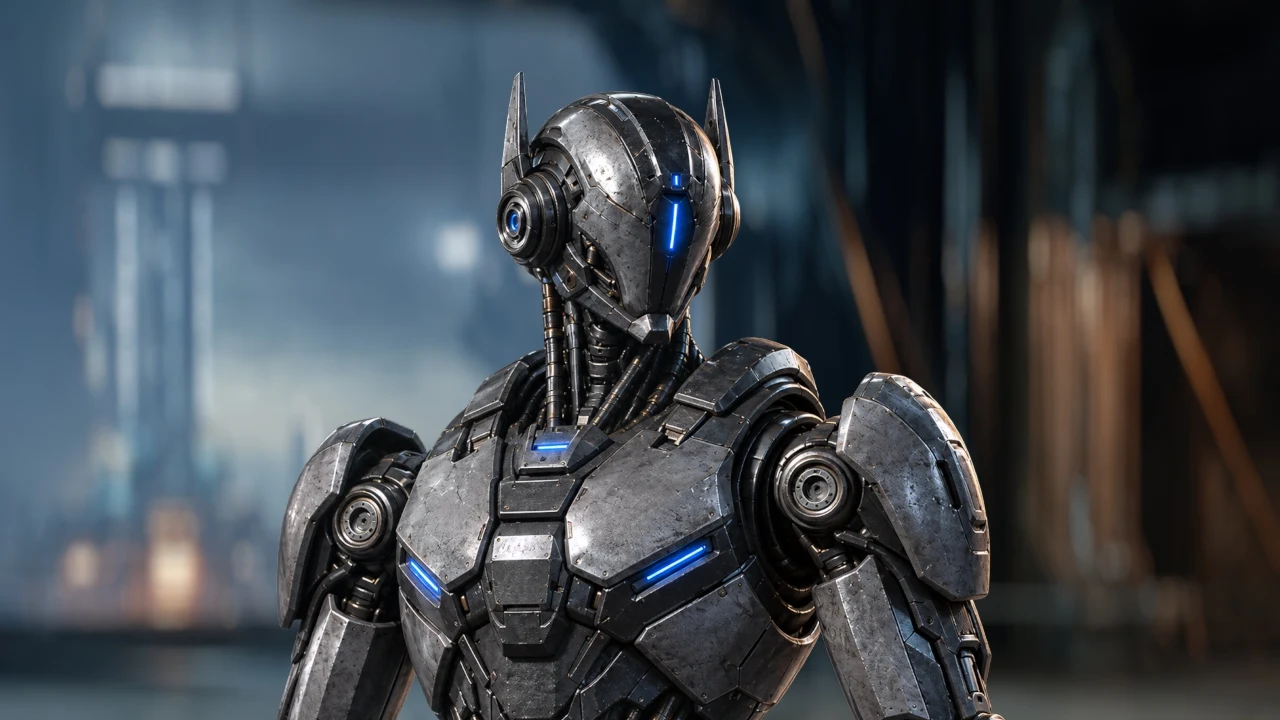
Three moves.
Connect — your element into Source, the plate into Target. Region — drag the box over the patch of plate the element actually sits on. Bake — freeze it into Gain and Offset when it looks right, or leave it live.
Controls
Every control, and what it is for
Defaults are the values it ships with. Nothing here needs a keyframe.
Auto Match — recomputes the match every frame. Off means fixed numbers. Algorithm — Black/White reads the extremes. Reinhard reads the average and the spread, for grain and flat plates. Strength — how much of the match lands. 1 is full, 0 is the original. Recover White — pulls the reference's cast back out of the highlights. Blacks stay matched. Recover From — where that starts. 0 is the whole range, 0.9 is speculars only. Premult — multiplies RGB by alpha on the way out, so this can feed a Merge with no Premult node after it. Direction — Source to Target, or the other way round. Sample % — how much of the extremes counts as black and white. Default 5. Temporal Samples — median across this many frames each side, against flicker. Default 5, max 15. Smooth Blend — eases across frames instead of snapping. Smooth Amount — how fast that ease moves. Lower is slower. Ignore Transparent — on by default. Only solid pixels are measured, so an element's transparent surround cannot drag the black point down. Never changes what is rendered. Region — sample inside a box you drag in the viewer, not the whole frame. Region Center / Size — the same box as numbers, in pixels. Gain and Offset — the gain and offset the whole match comes down to. Editable once Auto Match is off. Bake Match — freezes this frame into those two.
Highlights
Recover White
The control that stops a graded reference from staining your element.
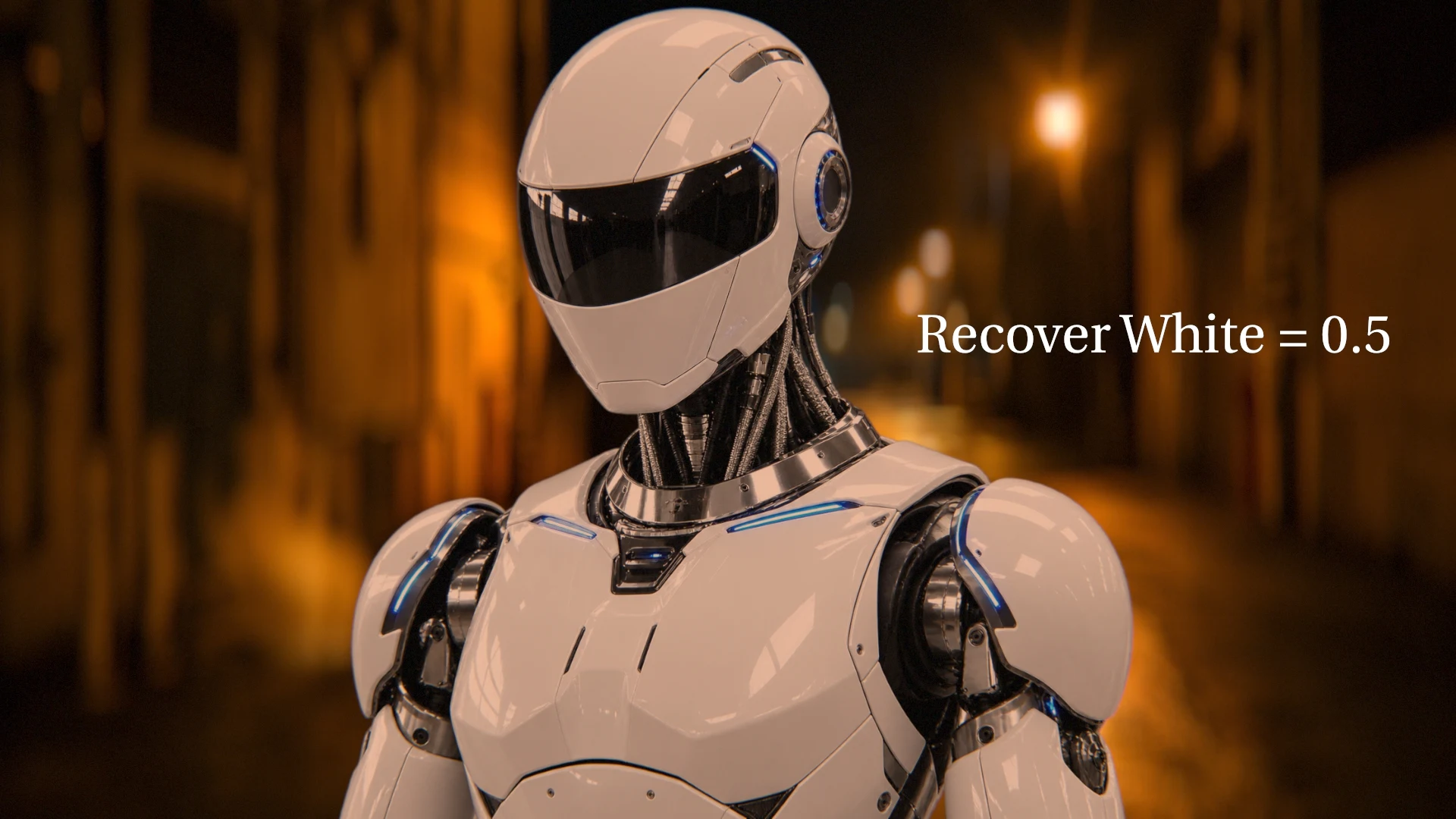
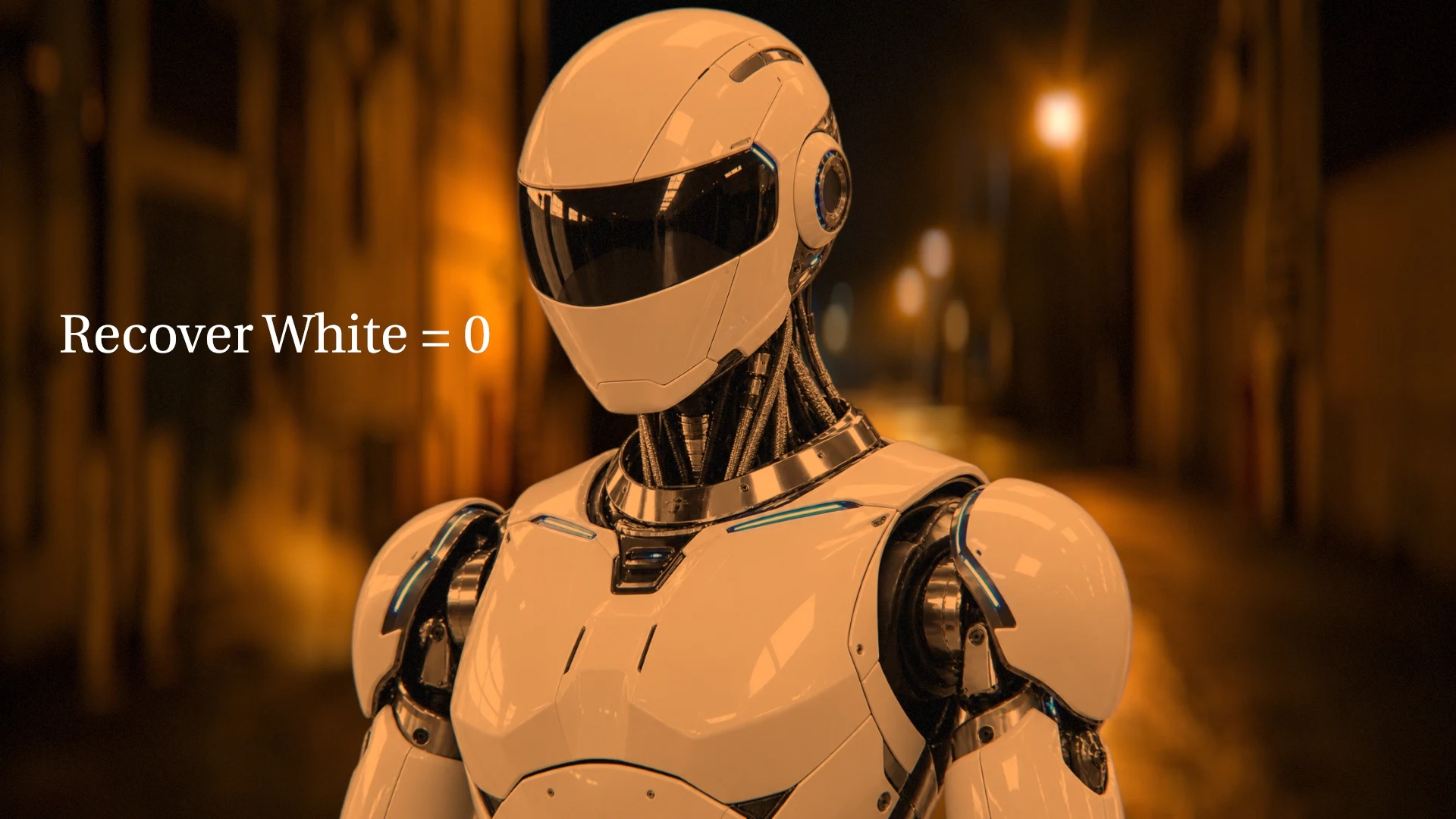
No match — the element's own white
Recover White = 1
Recover White = 1 Recover From = 0.5
The problem — a per-channel match drags your highlights toward the reference's colour. On a heavily graded plate that reads as a stain, not a match. The fix — Recover White closes the gain spread back up. That is the exact inverse of the stain, not a desaturation laid over the top. What stays — the blacks stay where the match put them, and neutral tones keep their brightness.
In practice
Built for shot work
Alpha — passed straight through, untouched. Threads — multi-threaded on CPU, and it stops the moment you cancel a render. Sampling — 60,000 pixels per input per analysed frame, so 8K analyses as fast as 2K. Safety — gain is clamped between 0.25 and 4.0, so a badly paired shot cannot blow up. Region maths — one box lands on the same physical area in both inputs, at different resolutions, pixel aspects or proxy levels.
What it is not.
Gain and offset, per channel, linear. No gamma, no curves, no per-hue work, no 3D LUT. It will not reconcile two shots that need a different transfer function. It puts an element onto a plate in a few seconds and leaves a gain and an offset behind. That is the whole job.
03Specifications
- Category
- Color
- OFX API
- 1.5
- Contexts
- General
- Bit depths
- 8-bit · 16-bit · 32-bit float
- Channels
- RGB · RGBA
- Processing
- CPU, multi-threaded
- Operating system
- Windows 10 · 11 (64-bit)
- Vendor
- ZHiCK
04The 7-day trial
The trial is the complete plugin — every control, your own footage, no features held back. One trial per machine.
When it ends the plugin keeps loading and keeps rendering the full effect, with a faint ZHiCK STUDIO watermark across the output. It does not vanish from the node list or fail a render: a licensing problem found at 2am should cost an obviously marked frame, never a farm job. Nothing about the paid version differs except the watermark — and anything that would hand you a result the watermark cannot reach.
05Installing it
ZHiCK Hub installs and updates the plugin for you, and is how the trial is issued. If you would rather not run it, the plugin is a folder you copy into the host's plugin path.
06Version history
- 1.16
16 Aug 2026 · 0.1 MB
Bake to Grade over a frame range. A single bake is one set of numbers, so on a shot whose light or camera moves it is right on the frame it came from and wrong everywhere else. ZHiCK > Color > Bake to Grade (range) walks the range, measures every frame, and writes the answers as keyframes on the Grade — delete the matcher afterwards and the comp renders the same on every frame with no plugin installed. It also settles Smooth Blend on a farm: a baked range has no ease left to depend on the order frames are rendered in. Measured against the plugin it replaces: the two agree to within a millionth of a stop.
13 earlier versions
- 1.15
11 Aug 2026 · 0.1 MB
Bake Match and Bake to Grade now need a licence. A running trial bakes exactly as a paid licence does; once a trial has ended, the controls that hand you a result the watermark cannot reach wait for one. Everything else is unchanged. Bake to Grade is now in the ZHiCK > Color menu (ctrl+alt+b), and it produces a Grade that renders identically to the plugin - measured to 1.19e-07 - so a comp survives deleting the matcher. It had never worked before this release: it wrote three values into a four-channel knob and left an empty Grade behind.
- 1.14
11 Aug 2026 · 0.1 MB
Stability release. The sampling Region box now stays where you put it instead of occasionally snapping back to the centre. The match no longer drifts on its own while a comp sits idle or when the node is toggled, and dragging any slider no longer flashes the un-matched frame. Smooth Blend now gives the same result however many times a frame is re-rendered. Temporal Samples now genuinely reads neighbouring frames. Smooth Amount is greyed out while Smooth Blend is off.
- 1.13
9 Aug 2026 · 0.1 MB
Ignore Transparent (default on): the sampler no longer counts a premultiplied element's transparent surround as content. Premult on output. Region handles in CI green. FrameVarying declared. EULA 1.3.
- 1.11
9 Aug 2026 · 0.1 MB
The node now carries its own mark instead of the shared ZHiCK one: a reticle on a disc that is half as-shot and half matched. The plugin binary is byte-identical to 1.10 - nothing in the render path changed, and your existing comps and licences are unaffected.
- 1.10
8 Aug 2026 · 0.1 MB
Corrects the licence agreement that ships inside the plugin. The one in every build up to 1.9 was still a draft: it offered a 14-day refund the shop does not give, listed licence tiers retired months ago, and described a host requirement belonging to one specific plugin. The plugin binary is unchanged from 1.9.
- 1.9
8 Aug 2026 · 0.1 MB
Stops DaVinci Resolve crashing. getClipPreferences passed null where the OFX API wants somewhere to write, which Resolve stores through and Nuke tolerates -- dropping the node on a clip took the whole application down. The overlay is also guarded on the interact suite existing. The plugin now declares which applications it will load in, and refuses the rest rather than appearing where it cannot work. The trial watermark is 3 to 6 times cheaper to draw, with the output unchanged.
- 1.8
7 Aug 2026 · 0.1 MB
ZHiCK > Color now shows the node and nothing else. Easy Comp and Bake to Grade are still installed and still work; they are simply not in the menu.
- 1.7
7 Aug 2026 · 0.1 MB
The ZHiCK mark now appears on Nuke's node toolbar. Earlier builds set it from Python, which only reached the menu - the toolbar button is built before that runs, so it kept Nuke's default. It now ships inside the plugin bundle where the host reads it, which also means it works in hosts that run none of our Python.
- 1.6
7 Aug 2026 · 0.1 MB
Renamed to Z_ColorMatcher. ZHiCK now has its own mark on Nuke's node toolbar and the node sits under ZHiCK > Color, in studio green. Easy Comp (Ctrl+Alt+C) and Bake to Grade (Ctrl+Alt+B) ship with the plugin - Bake to Grade produced an identity Grade in earlier builds and now bakes the real match. Plugins install into the ZHiCK folder under OFX/Plugins and the installer removes the older loose copy for you. Your licence and saved comps keep working unchanged.
- 1.4
5 Aug 2026 · 0.1 MB
Region box fix: a box that misses one input entirely (for example a tightly-bounded element) now falls back to sampling that whole input instead of silently cancelling the match. A box that partially overlaps still samples just the overlap.
- 1.3
5 Aug 2026 · 0.1 MB
Fixes Nuke crashing the first time an unlicensed node was viewed (1.1-1.2): the licence notice tried to open a dialog from the render thread - removed, the watermark itself is the signal. Licence changes still apply live from ZHiCK Hub with no host restart, and the check no longer depends on the host apps bundled VC runtime. 1.2 was withdrawn; this build supersedes it.
- 1.1
5 Aug 2026 · 0.1 MB
Unlicensed mode reworked: the full effect now renders with every control live, and the magenta bars are replaced by a faint ZHiCK STUDIO watermark tiled over the output. Licensed rendering is unchanged.
- 1.0
3 Aug 2026 · 0.1 MB
First public build. Live per-frame colour match with a draggable sampling region, temporal median, and Bake Match to Gain/Offset or a Nuke Grade node.
07Licence
End User Licence Agreementv1.3 · 10 August 2026
ZHiCK products
End User Licence Agreement

Version 1.3, 10 August 2026

Vendor:        Thanadet Sribandit, trading as ZHiCK (sole trader, Thailand)
Contact:       zhickstudio@gmail.com
Governing law: Thailand

This agreement covers any ZHiCK product you buy a licence for — a plugin
today, and anything else sold under the ZHiCK name later. Tools given away
free, including ZHiCK Hub, are not licensed under this agreement; their use is
covered by the terms of sale instead.

The terms of sale, and the current version of this agreement, are at
https://zhickstudio.com/terms

Sections 7 and 8 describe how a plugin behaves inside a host application, and
apply only to products that are plugins. Everything else applies to every paid
product.

-------------------------------------------------------------------------------
1. Licence, not sale
-------------------------------------------------------------------------------
The software is licensed to you, not sold. ZHiCK retains all rights, title and
interest in it, including all intellectual property rights.

Subject to your compliance with this agreement and payment of the applicable
fee, ZHiCK grants you a non-exclusive, non-transferable licence to install and
use the software on the number of machines stated on the licence you bought.
That number is shown on the product page, on your receipt, and in your account.

A seat may be moved to another machine at any time, from your account.
Re-activating a machine you have already activated does not consume a second
seat, and reinstalling or losing the licence file costs you nothing.

-------------------------------------------------------------------------------
2. Which licence you need
-------------------------------------------------------------------------------
Licences come in two kinds. Which one applies depends on who pays for it, not
on what you use it for.

An Individual licence is bought by one person, with their own money. You may
use it on client work, on commercials, on features, on anything at all — there
is no restriction whatsoever on the work you produce with it. What an
Individual licence does not cover is a company buying it on your behalf, or
reimbursing you for it afterwards.

A Studio licence is bought by a company or other organisation, and covers up to
the number of machines stated on it. If the cost is met from a business
account, this is the licence that applies — whether the software ends up
running on five machines or on one.

Dividing them this way is what keeps the individual price where it is. If your
circumstances change after you buy, because you join a studio or a client takes
over the cost, write to the address above and the difference will be settled
sensibly.

-------------------------------------------------------------------------------
3. What you may not do
-------------------------------------------------------------------------------
You may not redistribute, resell, rent, lease, sublicense or publish the
software; remove or alter any notice in it; or reverse engineer, decompile or
disassemble it, except to the extent that applicable law expressly permits this
despite the restriction.

A licence covers you, or the organisation named on it — see section 2. It may
not be shared with another company or bundled into something else without
written permission.

-------------------------------------------------------------------------------
4. Your output is yours
-------------------------------------------------------------------------------
ZHiCK claims no rights over images, sequences, projects or any other output you
produce using the software. You may use that output commercially without
restriction or attribution.

-------------------------------------------------------------------------------
5. Updates and support
-------------------------------------------------------------------------------
A licence includes updates within the same major version — a 1.x licence
receives every 1.x release — at no further cost. Support is by email, at the
address above.

-------------------------------------------------------------------------------
6. Trial, and no refunds
-------------------------------------------------------------------------------
Purchases are final and are not refunded. This is why a free trial of the
complete product is offered first: every control, your own footage, nothing
held back. Please confirm the product does what you need, in the application
and version you actually use, before buying.

Where the law of your country gives you a refund right that cannot be waived,
that right is unaffected by this clause.

-------------------------------------------------------------------------------
7. Supported applications  (plugins only)
-------------------------------------------------------------------------------
Each plugin states which applications it is supported in, on its product page
and in ZHiCK Hub. Support means the plugin has been run there and is expected
to keep working there.

A plugin will not load in an application it does not list — it refuses rather
than appearing where it cannot work properly. Applications not listed are not
supported, whether or not the plugin happens to run in them.

-------------------------------------------------------------------------------
8. If a licence cannot be verified  (plugins only)
-------------------------------------------------------------------------------
The plugin checks its licence on your machine, offline. It never contacts a
server to do so.

If no valid licence is found — during a trial, after one expires, or if the
licence file is missing — the plugin still loads and still renders the complete
effect, with a faint "ZHiCK STUDIO" watermark across the output. It does not
disappear from the plugin list and does not fail a render. A licensing problem
should cost you an obviously marked frame, never a farm job or a deadline.

-------------------------------------------------------------------------------
9. No warranty
-------------------------------------------------------------------------------
The software is provided "as is", without warranty of any kind, express or
implied, including but not limited to the warranties of merchantability,
fitness for a particular purpose and non-infringement. You are responsible for
verifying its output before using it in delivered work.

-------------------------------------------------------------------------------
10. Limitation of liability
-------------------------------------------------------------------------------
To the maximum extent permitted by law, ZHiCK's total liability arising out of
or relating to this agreement is limited to the amount you paid for the
licence. ZHiCK is not liable for any indirect, incidental, special or
consequential damages, or for lost profits, lost data, or missed deadlines.

Nothing in this agreement limits liability that cannot be limited by law.

-------------------------------------------------------------------------------
11. Termination
-------------------------------------------------------------------------------
This licence ends automatically if you breach it. On termination you must stop
using the software and remove all copies.

-------------------------------------------------------------------------------
12. Third-party software
-------------------------------------------------------------------------------
The software includes third-party components licensed under their own terms.
See THIRD-PARTY-NOTICES.txt, distributed with the product.
08Still deciding?
Ask me anything about it — whether it fits your shot, your host version, or your pipeline. I built it for my own work, so the answer is usually specific.
zhickstudio@gmail.com